When performing a Regular Update using a USB drive, please ensure that you select and download the appropriate software version for your specific region. Downloading software intended for a different region, even for the same vehicle model, may result in a failure of the telematics unit.
We strongly advise you to carefully select the correct region to avoid any potential issues.
Thank you for your attention to this matter.
New features and enhancements
Major
update of the entire map data for your navigation system
We
have updated all map data – including numerous new locations, improved road
data and enhanced accuracy – to ensure a more precise and reliable driving
experience.
Navigate
with confidence, knowing that your routes are now more up to date than ever.
Type of head units available to update
Provides navigation update about map and improvements. For the new version information, please refer to ‘List of eligible vehicles available to download’ in this notification.
▷ Navigation systems available to update : Systems with the following representative screen
Standard-class Gen5 Navigation
Compact Gen5 Navigation
Standard-class Gen5W Navigation
ccNC Navigation
Disclaimer
Please only use the official NaU (Navigation Updater) software found on this website to download your map Downloading or copying it from other sources can lead to update failures and lead to critical issues to the navigation system
If you experience any issues while using the NaU software or before/after installation, please contact Kia Customer Care
If your navigation system has a SD card, you need to use SD card for updating the software and map
The SD card slot is located just below/above the vehicle display screen
If your vehicle has a 16 GB SD card, please purchase a high-grade 32 GB SD card
~ Please do not use micro SD card ~
If your vehicle has a 32 GB SD card, please use it to update
Please do not use SD card to save music or other data files
If your navigation system does not have a SD card, you need to use a USB flash drive for updating software and map
Please format (ExFat) the USB before using the NaU software
When selecting your vehicle, make sure the model/model year are correct before starting the download process
If the wrong model/model year is chosen, the update cannot be performed
Please select the correct drive on your PC if you connect multiple media to your PC
Disconnect the media after only after confirming the download process is complete
Disconnecting the media during the download process can lead to corrupt files and a map update failure
Note:
this update provides software (that may include adding new features and removing others) and map data that may change user and interface experience
After installation, it is not possible to revert to the previous software version
Certain new features such as Connected Routing and Weather Data require active Kia Connect subscription to access
Warning:
During vehicle software installation, engine must be running to keep the battery charged Do not turn off the ignition switch or eject SD card/USB during upgrade procedure
Updating navigation while idling may violate the relevant traffic regulation
Please be sure to comply with your local traffic regulations before proceeding with the update
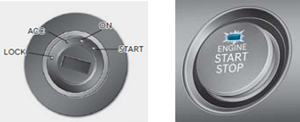
How to double check your car is running
The start switch should indicate “ON” or the light on the start button is lit
a software update could effect the functionality of aftermarket component (i.g. aftermarket rear view camera, speakers, etc.)
If you have any questions, please reach out to Kia Customer Care or the Customer call center
Cannot be downloaded on a tablet or other mobile device.
Please download it on a PC.