Infotainment System
Learn more about over-the-air (OTA) updates
09-30-2024704 Pogledi
Is my car “over-the-air” OTA capable?
All cars from model year 2022 onwards, equipped with a telematics unit are technically capable to receive over-the-air (OTA) updates.
What are over-the-air updates?
Your car is connected to the internet with a SIM card, just like a smartphone. The update data is therefore sent from our server to your car "over-the-air" using the existing mobile connection.
Benefits of Over-the-Air Updates:
- Fast, Easy and Convenient Updates: Updates are delivered over-the-air to your vehicle through its built-in connectivity, removing the need for manual installations or dealership visits
- Quick Resolution of Software Issues: Bugs can be quickly fixed, ensuring your vehicle continues to operate at its best without the need for you to visit a Kia dealership, or without going through the manual update process
- Continuous Innovation at Your Fingertips: With each update you receive not only new and updated maps, but also exciting new features and functional improvements for your software. Learn more about the latest update

How to enjoy your two free OTA updates
Your current software is too old to support over-the-air updates. You will need to update it manually to start your free one-year OTA Updates trial. Simply use our Kia Navigation Updates website to download and install the latest software version for your Kia. Please note you will need a 64 GB USB stick and a computer with at least 54 GB of free memory and full administrator access.
After my free trial
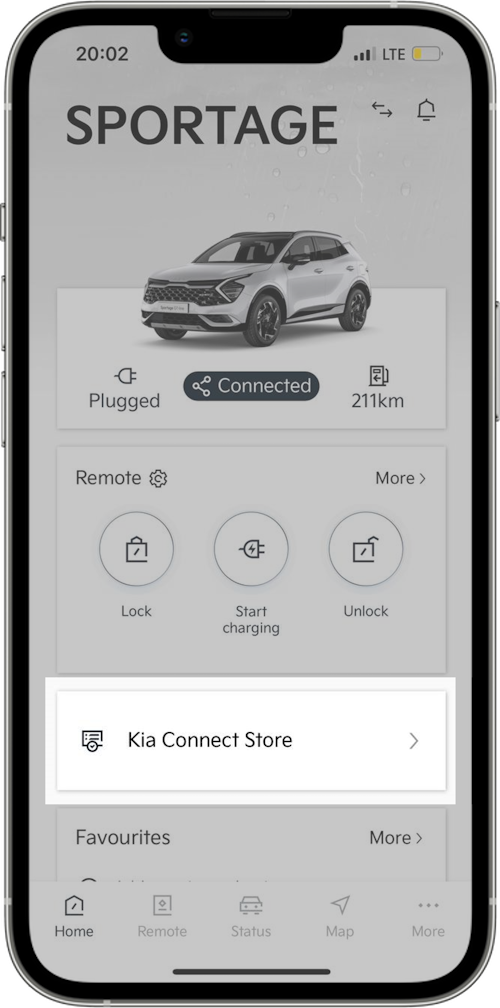
How do I access the Kia Connect Store to find the updates?
After opening the Kia Connect app on your mobile phone, you will find the store here:
I’ve made an order – when I will receive my update?
- If you have the previous software version, you will receive the latest version immediately
- If you already have the latest version, you will receive the next update as soon as it's released
- Additionally, you will receive the second update after that, once it becomes available (we provide updates twice per year)
For more information on how to setup OTA for map and infotainment click here:
https://connectstore-eu.kia.com/gb/en/info/product-usage-guide-map
https://connectstore-eu.kia.com/gb/en/info/product-usage-guide-map
등록한 차량이 없습니다.
소유 차량을 등록한 후 리뷰를 작성할 수 있어요.
※ 보유 차량이 보이지 않는 경우, 마이기아 모바일 앱에서 보유 차량을 등록해주세요.
로그인 후, 리뷰 작성해주세요!
내 차량을 선택하고 하드웨어와 소프트웨어를 구분하여 업데이트 리뷰를 작성해보세요
하루에 3개 이상의 리뷰를 등록할 수 없습니다.
이미 등록된 게시글인지 확인해주세요.
리뷰를 작성할 수 없습니다.
이용 제한으로 인해 업데이트 리뷰 작성을 하실 수 없습니다.
빌트인 캠 업데이트
아래 파일을 다운로드 받아,
USB 메모리 최상위 폴더에 복사해주세요.
Potrebna je namestitev programa Navigation Updater
Potrebna je namestitev najnovejše različice programa Navigation Updater. Po namestitvi ponovno pritisnite gumb »Prenos«, da se samodejno zažene.